
DUBBLE
Your ADHD-friendly Body-Doubling Companion
Overview
Dubble is a web application prototype developed for HCDE 315: Inclusive Design and Engineering. It explores how virtual body doubling —a strategy of working in the presence of a companion — and breaking tasks down into manageable steps could help students with ADHD address their personal challenges with task initiation and productivity.
I led the design of the task management interface and worked with my team to apply co-design methods by collaborating directly with a college student with ADHD through multiple weekly sessions to incorporate their experiences and feedback into our design decisions.
My Role
UX/UI Designer + UX Researcher
Team
4 Designers
Timeline
March–June 2026 (9 weeks)
Tools
Figma
the Problem
For students with ADHD, difficulty starting an assignment can lead to stress and shame, creating a cycle that makes initiating tasks even harder
While working with our co-designer, my team and I identified a recurring cycle where difficulties with task initiation and sustained attention contributed to stress and self-blame, making it even harder to stay engaged and get started.

This matters because students with ADHD may feel that they lack support or tools to manage their executive dysfunction. Many productivity tools fail to help users figure out how to approach an overwhelming task and break them out of the cycle.
To address this, my team and I asked:
How might we support students with ADHD reflect on the mental barriers that affect their productivity and find motivation to start tasks?
The solution
A body doubling tool that supports task initiation without pressure or shame
Our team designed Dubble to guide users through task breakdowns with a customizable virtual companion to help students with ADHD approach tasks and stay engaged. The prototype features ways to explore how breaking work into manageable steps and creating a sense of presence can make starting tasks feel less overwhelming.
Break Tasks Into Manageable Steps
Steps are broken down into smaller, actionable steps to give clear and digestible plan to get started on tasks
Reflect on your tasks
After completing a task, take a moment to reflect on how you felt

Work With Your Companion

Customize
Research
Methods: Interviews, Affinity Diagrams, Competitive Analysis
Background research
While existing strategies to help college students with ADHD include academic accommodations, research on their personal experiences is limited
I reviewed research on ADHD strategies, which suggested that college students with ADHD face greater academic and psychological challenges than their peers and lower self-esteem (Wenyandt et al., 2008). However, there has been little research done on how effective current strategies are to support ADHD (Wenyandt et al., 2008).
This highlights a need to further explore strategies and technologies that support students with ADHD.
Initial Interview & Co-Design
During the first co-design session, I conducted a semi-structured interview with our co-designer with ADHD and created my own affinity map based on what I gathered from my notes

After comparing affinity maps with my teammates, we identified important findings in our research:
Four key findings
“Not being able to be productive would be so much less of a problem if every instance of me not being productive wasn't followed by me shaming myself.”
02 - Attention deficiency creates cycle of not understanding to zoning out
“Lack of class engagement, energy, or not being able to keep up happens from being lost in lecture topics and building off topics [and leads to feeling] confusion, frustration, over-stimulation”
03 - Needing stress as a motivation for starting tasks
“And I have a much harder time focusing on a task 2 weeks away from its deadline than I do, like, 3 days before...I have a really hard time not working under, like, high pressure, high stress.”
04 - If something is not immediately acted upon, it becomes forgotten
“I'll see the message and I'll be like, oh, yeah, I'll reply to that later. Clear it. And just forget for like 2 days that that person messaged me.”
Competitive analysis: Focus friend

Opportunity: Remove guilt-tripping language, and focus on easing users into starting a task with structured step breakdowns rather than abruptly starting a timer.
Design direction
DESIGN concepts
I developed initial design concepts and presented it to my co-designer, where they chose to combine my database app concept with my teammate's body doubling concept.
My co-designer was initially skeptical that journaling would help with his executive dysfunction, but after I incorporated it later into Dubble’s workflow, they saw how the value of combining with the database app to help reflect on their task.
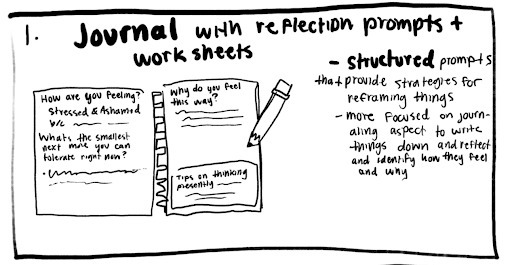

My initial concepts that were incorporated into Dubble
DESIGN GOALS
During a brainstorming session from my co-designer, my team and I created four design goals to guide our main features:
Motivate without gamification: Avoid adding points that could create distraction or pressure
Ease task initiation: Offer suggested steps instead of requiring users to start with a blank page
Re-engage without shame: Use neutral, supportive reminders rather than guilt-inducing notifications
Create a low-distraction workspace: Make the companion feel present without overwhelming the user
User Testing & Iteration
Methods: Wireframing, Concept Testing, Information Architecture, Usability Testing
Low-fidelity wireframes
I translated each of our design goals into low-fidelity wireframes, mainly exploring how to make the task management system and the app's structure and core interactions before developing the prototype.

Paper prototype testing
My team combined our wireframes into a paper prototype to test the user flow of our new wireframe layout. I acted as the facilitator for around 15 students and my professor to conduct usability tests.

Behavior noticed during testing: transition from completing a task back to the home page experience felt abrupt
Because of this, I proposed an optional reflection feature to give users a moment to reflect on how they felt after completing a task. This is when I incorporated the journaling concept I created earlier into the app.
I also received feedback from my professor that it would be helpful if tasks were imported directly from Canvas or Google Calendar to link the tools directly to assignments and reduce cognitive load.
Information architecture

Usability testing & Revisions
After finishing the mid-fidelity prototype with my team, I conducted usability testing with my codesigner and 12 participants to identify any pain points in the userflow. After receiving feedback, I independently revised the prototype:
Simplifying task creation
Problem
Participants were confused why a check was on the steps
Participants were locked on the page, unable to go back to homepage or task list
My co-designer took 10 seconds to add a new step as they didn't register the Add task button
Solution
Removed checks on each step
Added back buttons and removed unnecessary icons
Replaced with Add steps directly below each step


Revising current task page
Problem
The Check all step was not intuitive to our co-designer
I realized during testing the page was lacking an option to end a task early
Solution
Added End and Check all buttons to improve userflow

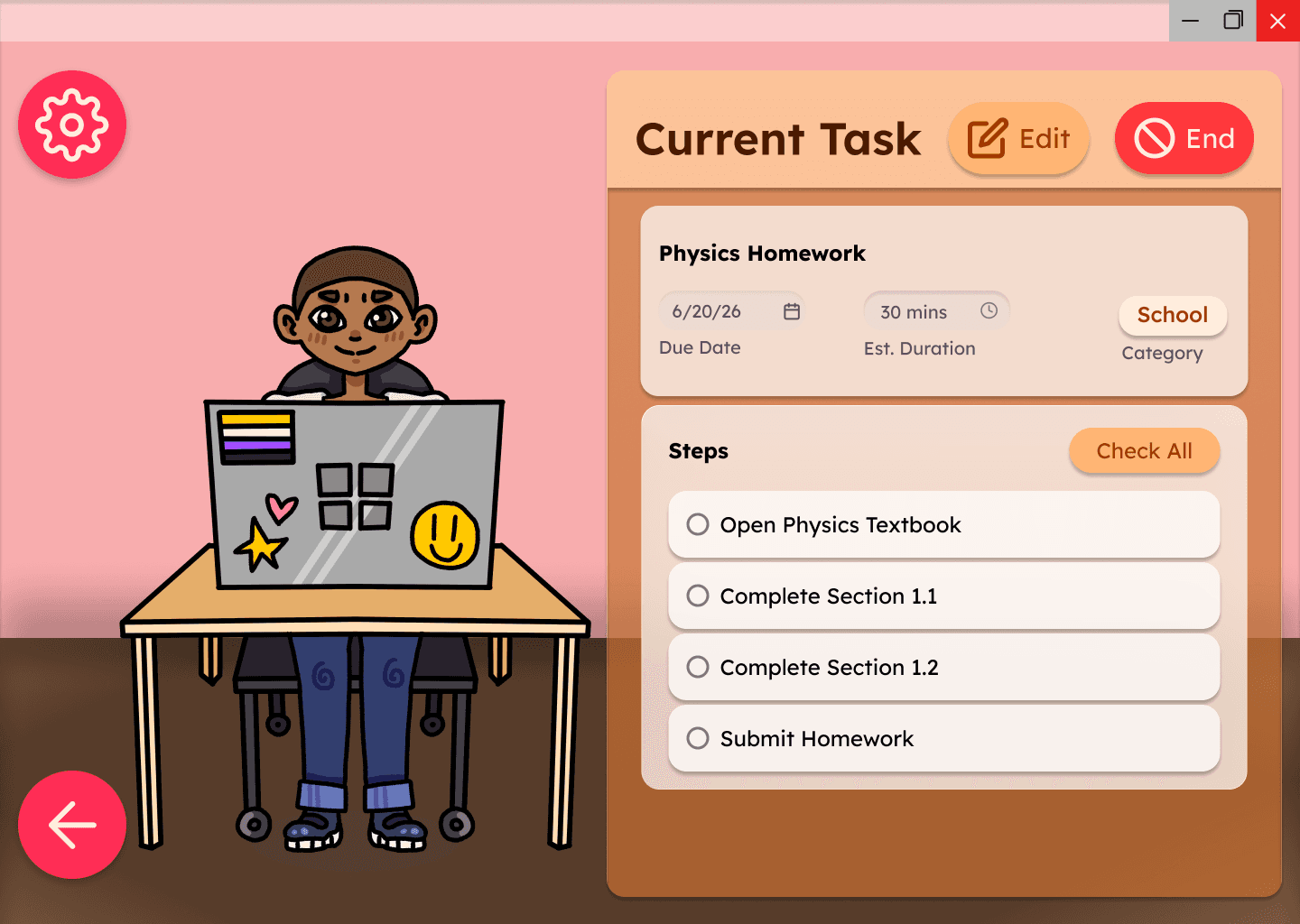
Results
Final feedback
After presenting my revisions to my co-designer, they found the task management approach helpful as it reduces the time needed to organize work and makes tasks easier to complete.
Addressed cold start for approaching: In testing, automated preset steps eliminated our co-designer's task paralysis
Unresolved challenges
Due to the 9-week scope, I was not able to develop some features I wanted to incorporate. My co-designer's feedback also highlighted opportunities to improve usability and personalization.
1-to-1 Body Doubling: I initially envisioned having a variety of task animations (cooking, reading, writing) to simulate more 1-to-1 body doubling only having the avatar at a desk workspace for the prototype
Reflection Journal: I wanted users to be able to view past reflections from task they completed so they could be able to see how they felt previously when doing a certain task
The Prototype
Conclusion
Summary
Dubble challenged me to rethink how design could support productivity without adding pressure. Through co-design and iterative prototyping, I explored how task breakdowns and an avatar-based body double could make starting tasks feel more approachable. My co-designer felt that the prototype addressed their pain points, which was important as it was their input drove my team's design direction. Beyond my co-designer, Dubble could also support others who struggle with task initiation by providing structure and companionship without requiring them to coordinate with another person to body double with them.
Learnings and reflection
Gamification doesn't work for everyone
Engaging with a co-designer exposed that traditional productivity mechanics (streaks, gamification, timers) often did more harm than good for those with ADHD. Most productivity apps my team and I analyzed assumed adding points, levels, and timers would make work engaging. I also thought that gamification early on by projecting what I thought would be motivating. But after working with my co-designer, I learned that timers instead caused them stress, and gamification would become another distraction.
The Value of Versatile User Experiences
A feature designed to help can easily backfire depending on who is using it. While a visible timer helps some people stay on track, our co-designer pointed out that watching the clock run down actually triggered intense anxiety for them. Testing reinforced that no two neurodivergent learners work the same way. Instead of deciding how someone should focus, good design provides flexibility—giving users the agency to toggle timers, customize prompts, and adapt the workspace to their own mental model.
Good UX should be neutral
One challenge I had to keep track of is to make sure that Dubble was neutral when trying to remind users to focus. Productivity apps had used guilt-tripping language when users were off task, so it was my priority to make sure that our method of calling our user back in would focus on making sure they weren't shamed for their actions and could also reflect on how tasks made them feel.
What's Next?
If I continued developing Dubble, I would try to evaluate the prototype with more students with ADHD to understand if there are different needs and working styles. I also wanted to try incorporating AI to help automatically break down tasks without users having to write the steps to further decrease cognitive load, similarly to how Goblin Tool's Magic ToDo list works.
References
Weyandt, Lisa L., and George J. DuPaul. “ADHD in College Students: Developmental Findings.” Developmental Disabilities Research Reviews, vol. 14, no. 4, Dec. 2008, pp. 311–19, doi:10.1002/ddrr.38.